Yes, that’s what Alex had suggested above.
Yeah, that error was due to multiple process, but I still get the unable to connect with chipwhisperer still, so I’m not sure how to resolve that.
You also can’t connect multiple times in the same notebook
Yes, I understand. I am not connecting multiple times, but the error still persists. for the first time that I am trying to connect too.
Even though I am only running one process without trying to connect multiple times, this error still persists. Could you please help me resolve it?
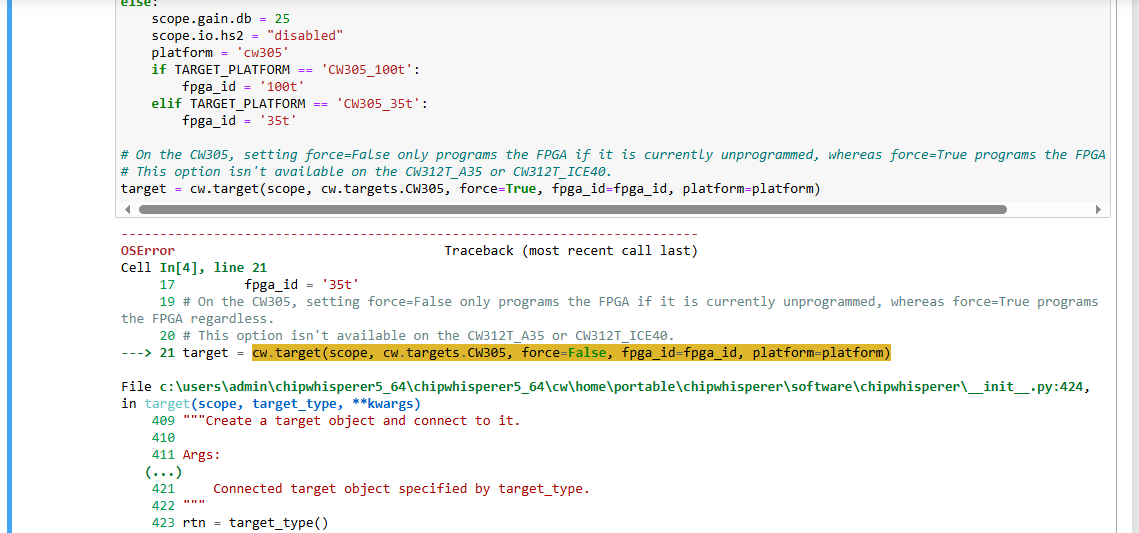
It’s hard to help you because we don’t have a clear picture of what you are doing; we also don’t have a clear picture of what is happening. For example in the screenshot of your last post, I see there is an OSError, but the screenshot does not show what actually threw the error. Also, at that point in the code it looks like you did have a scope object – does that mean you were in fact able to connect to the scope?
One of your earlier posts does clearly show scope = cw.scope() succeeding. So we don’t understand what problem you are facing.
In order get help, create a minimal reproducible example and clearly show all the steps you take which lead to the problem.
Definitely, So I have been trying to run the demos in jupyter notebook, In particular this one- " Breaking Hardware AES on CW305 FPGA (and other FPGA targets).", I have set the target as “TARGET_PLATFORM = 'CW305_100t”. But when I try to run the next set of code in the python notebook. This is the error I get: OSError Traceback (most recent call last)
Cell In[4], line 21
17 fpga_id = ‘35t’
19 # On the CW305, setting force=False only programs the FPGA if it is currently unprogrammed, whereas force=True programs the FPGA regardless.
20 # This option isn’t available on the CW312T_A35 or CW312T_ICE40.
—> 21 target = cw.target(scope, cw.targets.CW305, force=False, fpga_id=fpga_id, platform=platform)
File c:\users\admin\chipwhisperer5_64\chipwhisperer5_64\cw\home\portable\chipwhisperer\software\chipwhisperer_init_.py:424, in target(scope, target_type, **kwargs)
409 “”“Create a target object and connect to it.
410
411 Args:
(…)
421 Connected target object specified by target_type.
422 “””
423 rtn = target_type()
→ 424 rtn.con(scope, **kwargs)
426 # need to check
427 if type(rtn) in (targets.SimpleSerial, targets.SimpleSerial2)
428 and scope and scope._getNAEUSB().check_feature(“SERIAL_200_BUFFER”):
File c:\users\admin\chipwhisperer5_64\chipwhisperer5_64\cw\home\portable\chipwhisperer\software\chipwhisperer\capture\targets_base.py:65, in TargetTemplate.con(self, scope, **kwargs)
63 try:
64 self.connectStatus = True
—> 65 self._con(scope, **kwargs)
66 except:
67 self.dis()
File c:\users\admin\chipwhisperer5_64\chipwhisperer5_64\cw\home\portable\chipwhisperer\software\chipwhisperer\capture\targets\CW305.py:472, in CW305._con(self, scope, bsfile, force, fpga_id, defines_files, slurp, prog_speed, hw_location, sn, platform, version, program)
470 self.pll = PLLCDCE906(self._naeusb, ref_freq = 12.0E6, board=“CW305”)
471 self.fpga = FPGA(self._naeusb)
→ 472 self._naeusb.con(idProduct=[0xC305], serial_number=sn, hw_location=hw_location)
473 if not fpga_id is None:
474 if fpga_id not in (‘100t’, ‘35t’):
File c:\users\admin\chipwhisperer5_64\chipwhisperer5_64\cw\home\portable\chipwhisperer\software\chipwhisperer\hardware\naeusb\naeusb.py:803, in NAEUSB.con(self, idProduct, connect_to_first, serial_number, hw_location, **kwargs)
798 def con(self, idProduct : Tuple[int]=(0xACE2,), connect_to_first : bool=False,
799 serial_number : Optional[str]=None, hw_location : Optional[Tuple[int, int]]=None, **kwargs) → int:
800 “”"
801 Connect to device using default VID/PID
802 “”"
→ 803 self.usbtx.open(idProduct=idProduct, serial_number=serial_number, connect_to_first=True, hw_location=hw_location)
806 self.snum=self.usbtx.sn
807 fwver = self.readFwVersion()
File c:\users\admin\chipwhisperer5_64\chipwhisperer5_64\cw\home\portable\chipwhisperer\software\chipwhisperer\hardware\naeusb\naeusb.py:444, in NAEUSB_Backend.open(self, serial_number, idProduct, connect_to_first, hw_location)
438 def open(self, serial_number : Optional[str]=None, idProduct : Optional[List[int]]=None,
439 connect_to_first : bool =False, hw_location : Optional[Tuple[int, int]]=None) → Optional[usb1.USBDeviceHandle]:
440 “”"
441 Connect to device using default VID/PID
442 “”"
→ 444 self.device = self.find(serial_number, idProduct, hw_location=hw_location)
445 if connect_to_first == False:
446 return None
File c:\users\admin\chipwhisperer5_64\chipwhisperer5_64\cw\home\portable\chipwhisperer\software\chipwhisperer\hardware\naeusb\naeusb.py:411, in NAEUSB_Backend.find(self, serial_number, idProduct, hw_location)
409 dev_list = self.get_possible_devices(idProduct, attempt_access=(not hw_location))
410 if len(dev_list) == 0:
→ 411 raise OSError(“Could not find ChipWhisperer. Is it connected?”)
413 # if more than one CW, we require a serial number
414 if hw_location:
OSError: Could not find ChipWhisperer. Is it connected?
Let me know if any other information is required. Thank you.
Also, I tried running the same demo, with a different CW305 FPGA and I did not get any errors and I was able to run the demo fine. But it is only this CW305 FPGA board, that shows the error.
Ah, so what has been confusing us is that you never mentioned the CW305 until now! It sounded like you were unable to connect to your ChipWhisperer capture device (e.g. CW-Lite, CW-Pro or CW-Husky?), while in fact the problem is that you are unable to connect to your CW305 target. All this confusion could have easily been avoided. Now:
- How are you powering the CW305?
- What is the position of all its switches?
- Which of its LEDs are on or flashing?
- What cables are connected to it?
So in my current connection, I have the USB connected between the CW-Pro and my computer. Another USB connecting the FPGA to my computer. I have not connected the devices through any other power source. I have the FPGA connected to the CW-Pro through the 20 pin “Target Connector” and the SMA Cable.
All the switches on the FPGA is turned on. The LED displays show 1.01, ans there are no blinking lights. Only a red LED is on, along with a Green LED. Here is a connection photo.

There should be a red LED flashing near the Atmel chip. Your initial post said “after running the update firmware python codes, the device gives a connection error”.
I suspect that when you did this, you either programmed the wrong firmware, or the programming failed. Unplug any other chipwhisperer devices and follow the instructions here, in the “Accidentally flashed incorrect firmware” section: Updating Firmware — ChipWhisperer 5.7.0 documentation
Record the full output and post it here if you still have trouble connecting after this.
I read the documents and was able to clear the error. Thank you