ChipWhisperer Husky (also tested with CW Pro CW1200)
CW313 adapter
CW312T-RP2350 target board
Windows 11, CW 6.0.0
Background:
I’m trying to get started with the CW312T-RP2350 target board using the official aes_test.ipynb notebook from the cw_rp2350_fw repo. My primary setup is a CW Pro (CW1200) with a CW313 adapter. I checked with NewAE before purchasing and was told this combination should work. I also borrowed a Husky to rule out the CW Pro being the issue, but the problem persists with both.
The first step is flashing the firmware using program_rpi(), which calls erase_rpi() to put the RP2350 into BOOTSEL mode so it appears as a USB mass storage drive, then copies the .uf2 file across.
The problem is the drive never appears. When erase_rpi() runs, nothing shows up in Windows File Explorer or Device Manager at all as far as I can tell. I’ve been going through the usual suspects but I’m a bit stuck.
I noticed the 20-pin connector docs list pin 13 as PDIC/CS, so I tried using scope.io.pdic instead of scope.io.pdid as in the notebook, but no difference. I also tried adding a time.sleep(2) after erase_rpi() in case it was a timing issue, and verified the USB-C cable on the CW312 is a proper data cable. Power cycling via target_pwr also didn’t help.
Possible naming inconsistency:
I noticed the notebook calls program_rpi with the filename simpleserial-aes-rp2350.uf2, whereas building with cmake -DPICO_PLATFORM=rp2350-arm-s produces simpleserial-aes.uf2 without the -rp2350 suffix. Not sure if that points to a build issue on my end or if the notebook filename is just outdated.
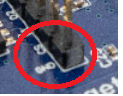
After some more testing it seems not connected to the platform (windows/Linux; husky/pro) and we also noticed that our boards do not have the pin headers with jumpers on them present on the board at all. Is that just an outdated picture or should it have had them?
Should we try adding those and set the jumpers like shown in the picture here?
Make sure you’ve reverted your changes to pdic / pdid; we’ve verified that the notebook works as-is on Windows, with a fix to the .uf2 file name as you noted.
On Linux it works for us when adding time.sleep(4) after erase_rpi(), and a forward slash is required in front of fw.uf2 in the shutil.copyfile() call.
You mentioned checking that the USB-C cable is good; I suggest swapping the Husky and target USB cables, to be 100% sure.
They are all set to on on both target boards. I tired again with the “default” notebook from the repo and it still does not show up as a device. I will report back after reinstalling. I probably skipped some setup step by accident.
Typically the RP2350 entering BOOTSEL just needs a few things:
A valid 12.0 MHz clock (for USB)
CS pin low
If you have a scope you could double-check the clock is appearing on the board at the correct frequency. This should be setup by the notebook. This gets routed to HS2 so the HS2 jumper routes this to the target. If other targets worked fine this suggests the CW312 baseboard is setup correctly.
The CS pin should be shorted as routed via the programming utility. You might want to force it by adding a jumper here (can be a pair of tweezers, wire, etc as no headers normally are there)
The factory test uses the GPIO pin to do this so doesn’t need this jumper - which means the board should have worked without it, but it’s something else you can check!
Before above, may want to make sure it wasn’t a missed USB problem. A few checks I normally do with USB-C:
Flip the USB-C cable around (there is 2 pairs of USB2.0 data pins - a bad solder joint on one might mean the cable works only one way).
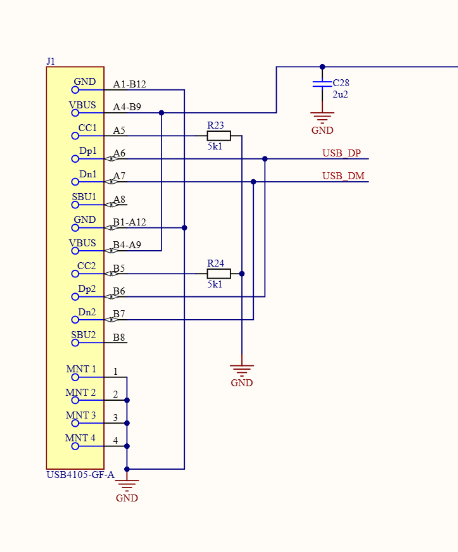
Connect the USB-C cable via a USB-C to USB-A adapter (OR find a USB-A to USB-C cable). If this works it’s a bad solder joint on the USB-C CC resistors (or they are missing - lots of products mess this up, so when something doesn’t work with USB-C it’s the first thing I check).
These are R23/R24 on the schematic. I think our test computer uses a USB-C to USB-A cable so our test would actually pass if those had a bad solder joint (it could be on the resistor OR on the USB-C connector).
We have tried shorting the CS pin in two different ways (wire and jumper) and it still does not work. I made sure everything was upgraded (CW platform/firmware, RP2350 firmware) and I have tried multiple cables (both USB-C and USB-C to -A). This is the behavior we see in both Windows and Linux with two CW kits (PRO and Husky).
One question though: should my machine detect the RP2350 target board when it’s not in BOOTSEL mode? This is the behavior I see with a normal Raspberry Pico 2, but it’s not the case for the CW target board.
For the record, we are testing the pre-release versions we got from you (thanks again!), so could it be just a bad batch? I know we are not entitled to support on this, so we very much appreciate any time you’ve spent helping us.