I have been trying to glitch by connecting the ChipShouter in the glitch port of the ChipWhisperer Lite following the ChipShouter manual. The targeted block cipher is AES. I am following the tutorial of Fault attack using CW on AES The following API calls are used.
(I am not using : scope.glitch.output = ‘enable_only’)
Apart from this, do we need to keep the glitch width (scope.glitch.width) and glitch offset /external offset as the parameters?
Or is it like glitching using the pulse width (cs.pulse.width) only?
Could you please suggest if I am not been able to follow up?
When triggering ChipSHOUTER from hardware, the cs.pulse parameters have no effect.
The hardware trigger is directly connected to the high-voltage switch. This is explained in the “SMB Trigger Input” section of the ChipSHOUTER user manual.
Thank you for the suggestion. So, we don’t have to send the arm and pulse command every time I perform a glitch using the ChipSHOUTER with cs.armed=1, cs.pulse =1 commands?
In the section of the manual, the below is mentioned:
--setup your scope.glitch settings–
scope.glitch.output = “enable_only”
scope.io.glitch_lp = True
However, instead of the above API calls, if I use –> scope.glitch.output = ‘glitch_only’ , then do I need to set the values of the — scope.glitch.width and —glitch offset /external offset like we used for the Voltage Glitching?
ChipSHOUTER must always be armed first – you’ll get an error if it’s not.
But if you’re using a hardware trigger, then don’t call cs.pulse.
With a hardware trigger, the scope.glitchparameters control the shape and timing of the glitch. All you control on the ChipSHOUTER side is the voltage level.
Thank you for your guidance. I will control the Voltage level on the ChipSHOUTER for performing the fault attack.
Also, Is this independent to the scope.glitch parameters? Otherwise, should the scope.glitch parameters be also used in parallel to control the shape and timing of the glitch?
I will follow both to get the glitched ciphertext using the ChipSHOUTER then if it is possible.
As I said, scope.glitch settings are what will determine the shape (duration) and timing of the glitch. The glitch shape will also be impacted by the ChipSHOUTER’s voltage setting and tip.
Refer to the manual’s “Pulse Shape Monitoring” section to learn how you can see the effect of all these parameters on the glitch shape.
As an eg: Considering the AES Block Cipher, while putting the trigger following the code snippet of the ChipWhisperer GitHub repository below:
uint8_t get_pt(uint8_t* pt, uint8_t len)
{
aes_indep_enc_pretrigger(pt);
trigger_high();
#ifdef ADD_JITTER
for (volatile uint8_t k = 0; k < (*pt & 0x0F); k++); #endif
aes_indep_enc(pt); /* encrypting the data block */
trigger_low();

aes_indep_enc_posttrigger(pt);

simpleserial_put('r', 16, pt);
return 0x00;
}
——————————————————————————————
While connecting the ChipWhisperer with the ChipSHOUTER, so to emit the EM Pulse using the ChipSHOUTER for the fault attack perspectives, do we need the the scope.glitchparameters control the shape and timing of the glitch? Also, I wanted to check if we need to call the cs.pulse too in this case where we already have the trigger?
Pulse widths, settings (if using internal pulse generator)
arm the device using:
front-panel button, or
sending arm command, or
external IO pin on RJ12
Triggering the pulse using:
the pulse front-panel button, or
the pulse command, or
external IO pin on RJ12, or
external hardware trigger
It’s very important to first understand the high-level operation before getting into the details of how to do these things.
The triggering options in section 3 above are mutually exclusive. You must first figure out which one you want to use.
In your case, it sounds like you want the CS pulse to be triggered by your target’s trigger_high().
One way to do this is to use your ChipWhisperer capture device’s (scope) glitch module.
It goes like this:
target issues trigger_high()
this triggers your scope’s glitch module to issue a glitch
the characteristics (shape, timing) of this glitch are controlled by the scope.glitch settings
by properly connecting your scope and ChipSHOUTER and configuring ChipSHOUTER as explained in section “External Trigger & ChipWhisperer Glitch Output” of the ChipSHOUTER user manual, the scope’s glitch output will directly drive ChipSHOUTER’s high voltage switch (this is explained in the “Background and Quick Start Guide” section of the manual).
One way to think about this is that you are doing exactly the same as what we teach in our voltage glitching notebooks, except that you are doing an EM glitch instead of a voltage glitch. To get a proper understanding of how this works, you should definitely first go through our voltage glitching notebooks. Once you’ve done this, you’ll be much better equipped to understand how to add ChipSHOUTER into the picture.
You will then still need to configure ChipSHOUTER’s capacitor bank voltage, and arm it, but that’s all. The shape and timing of the glitch is completely controlled by scope.glitch — you do not use cs.pulse at all in this scenario.
Thanks a lot for all these information!
I tried glitching using the above methodology as you suggested, but this time while running several experiments to observe the faulty ciphertexts, the ChipSHOUTER is getting disarmed in a while.
I am not using ‘cs.pulse’ this time, and the glitch is fully controlled by the scope.glitch parameters.
Could you please see if I am missing anything here?
Followed this below glitch settings.
scope.glitch.clk_src = “clkgen”
scope.glitch.output = “glitch_only”
scope.glitch.trigger_src = “ext_single”
Also, I wanted to know if we can connect the CW-Lite device with any other FPGAs apart from CW305? As we can generate the bit file of AES using the CW305 FPGA, likewise Can we connect the bitstream for Nexys4 DDR board in the ChipWhisperer device?
How can we proceed with this?
All our target boards are on readthedocs. You’ll see that we have several FPGA target boards.
We don’t support third-party FPGA boards. That doesn’t mean you can’t use them with ChipWhisperer; you almost certainly can. But we can’t help you with that.
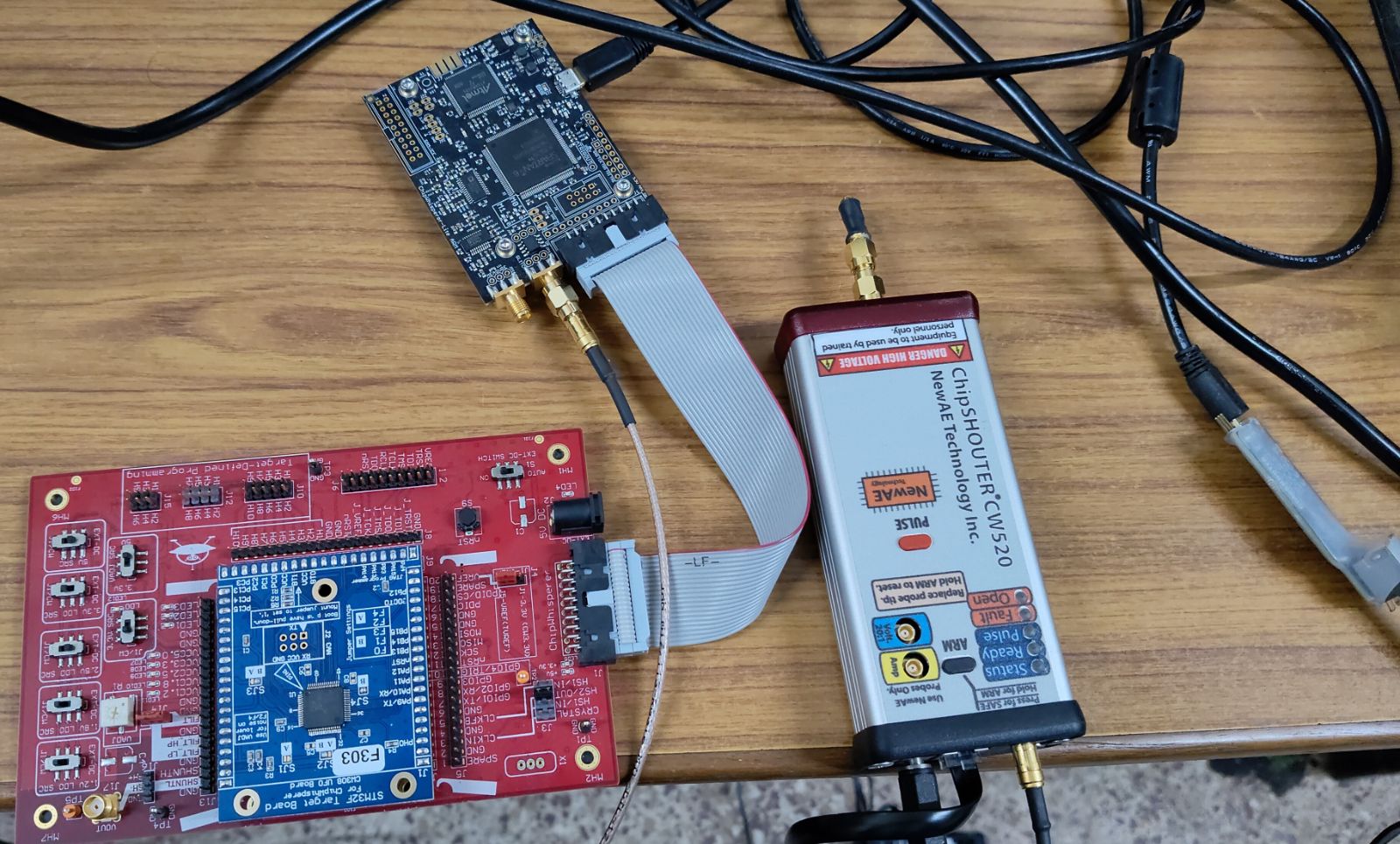
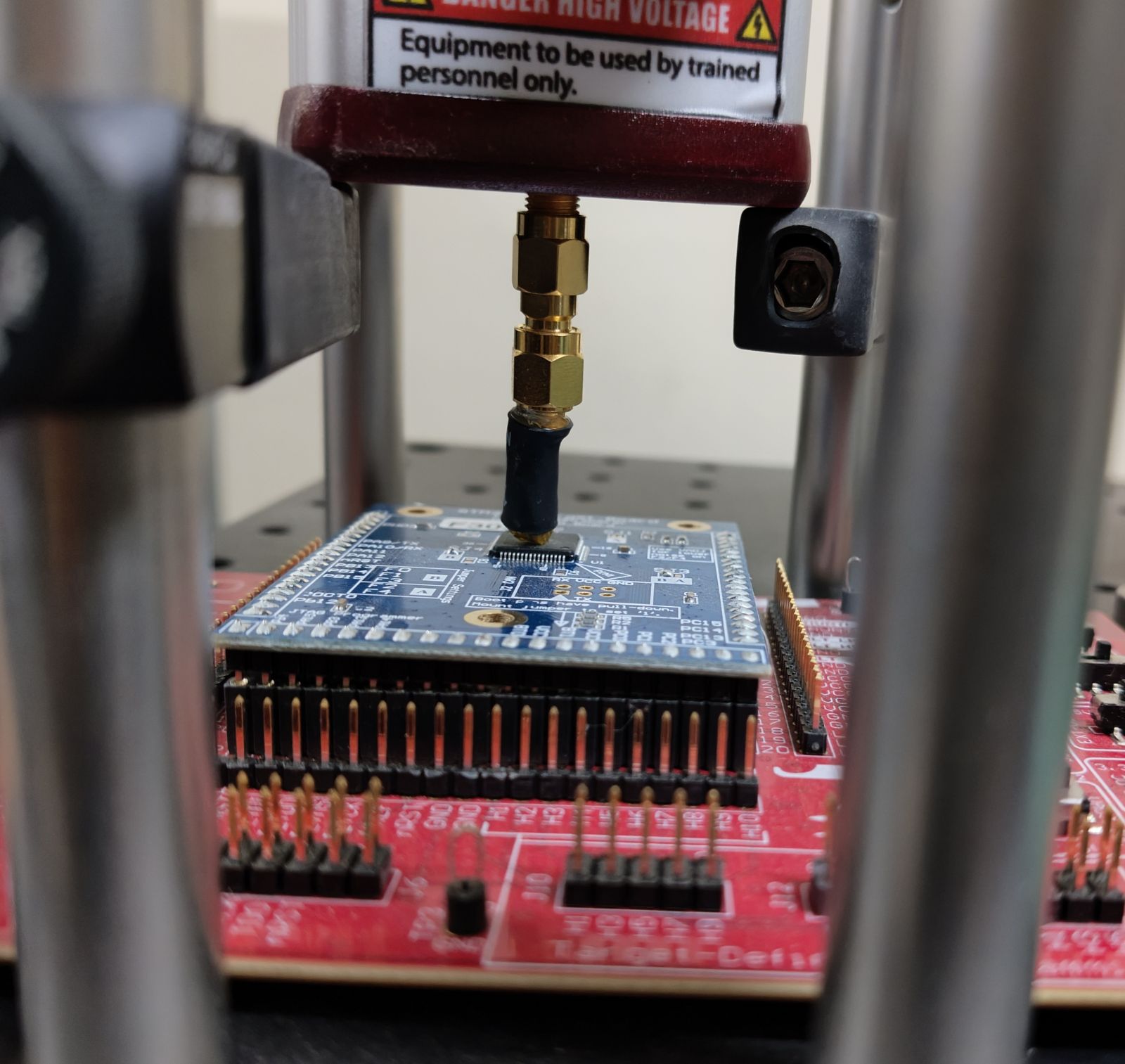
The active low trigger is coming out from the ‘glitch port’ of the CW-Lite. The MOSFET is driving the ChipSHOUTER trigger input. I am attaching the images here for your reference to know if this is the correct connection to proceed.
That’s mostly correct: the ChipSHOUTER user manual clearly states that you should set scope.io.glitch_lp only (not scope.io.glitch_hp), and that scope.glitch.output should be set to “enable_only”.