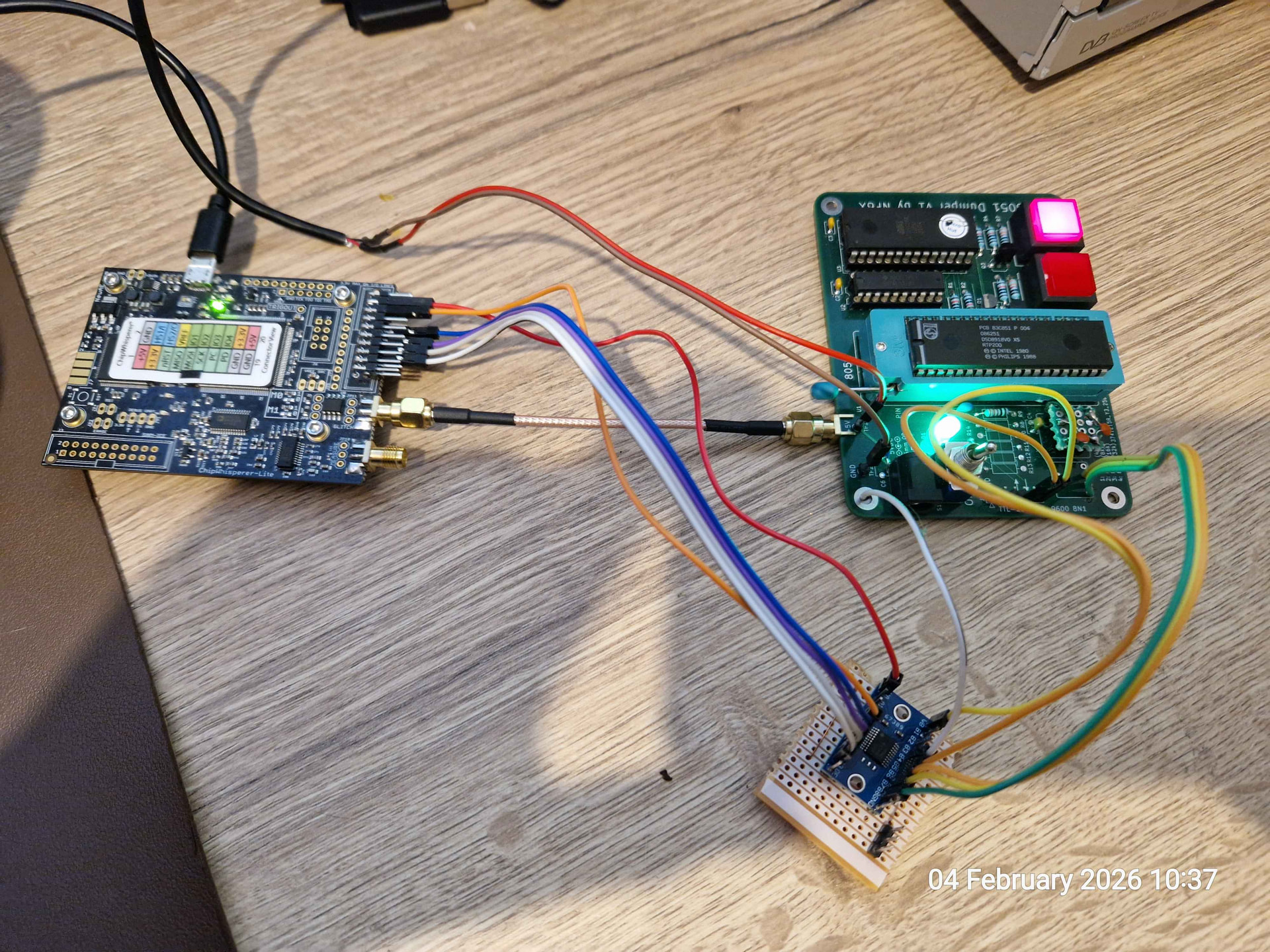
My goal is to issue a reset pulse some ext_offset time after a trigger. The pulse needs to be long enough for the target (in my case 8051-flavoured chip) to reset. The 8051 is running custom firmware from where I can issue the trigger. The trigger works but the pulse doesn’t.
CW-Lite → I am using scope.glitch.output = "enable_only" which I believe should issue a scope.glitch.repeat-wide 3.3v pulse from the SMA glitch port. However, this isn’t happening - in fact there doesn’t seem to be anything at all on that port if I set output to enable_only.
I connected the ‘scope to the SMA glitch port and cannot see any pulses generated.
I am using a very short test below to rule out any issues with the target, however, the manual_trigger() doesn’t seem to actually trigger anything and the “armed” LED on the CW-Lite stays lit. Naturally, nothing is coming out of the SMA socket either.
You’ve misunderstood how the ChipWhisperer glitch port works. It does not send out a pulse. When ChipWhisperer generates a glitch, it turns on transistors that connect the measure port to ground. When connected to one of our target boards, this results in “crowbarring” the target supply to ground.
I don’t know how your target is connected, but I would not recommend crowbarring for 8192 clock cycles! I may have misunderstood what you’re trying to do, but if your goal is to simply reset your target, this is definitely not how I would do it.
Otherwise, one issue with your code is that the scope does not need to be armed prior to the manual_trigger() call.
“enable_only”: Output is high for repeat full clock cycles.
To me, that does not read as crowbar but simply emits a high output for a number of repeats. And that it only crowbars when the the output = “glitch_only”. If I was crowbarring for 8192 periods, then yikes!
My code has scope.io.glitch_lp/hp = True, which should probably be set to False.
So, what I would like to do is:
Issue an “erase internal EEPROM” command to the protected 8051 target
Just before the 8051 initiates the block erase, I trigger the CW on one of the port pins
CW waits ext_offset samples and triggers a reset using enable_only with SMA glitch port connected to the reset pin 9 on the 8051 (via a TTL level shifter).
Here’s the code for the 8051 that is launched from external EEPROM:
do_block_erase:
        SETB    TRIGGER             ; Trigger HIGH
        NOPs
        CLR     TRIGGER             ; Trigger LOW
        NOPs
        MOV     EADRH, #80h         ; Security byte address high
        MOV     EADRL, #00h         ; Security byte address low
        MOV     ECNTRL, #0Ah        ; Block erase mode
        MOV     EDAT, #00h          ; Start erase

; I want to reset here somewhere

wait_erase:
        MOV     A, ECNTRL
        ANL     A, #20h             ; EWP bit
        JNZ     wait_erase

        ; Success
        MOV     A, #SW1_OK
        LCALL   send_byte
        MOV     A, #SW2_OK
        LCALL   send_byte
        LJMP    cmd_done
The idea is that it erases the security byte but not the EEPROM data. I have already managed to somehow interrupt the erase process through random glitching where the sec bits were cleared without erasing the EEPROM but the repeatability is extremely low. So I thought that instead of glitching, I could issue a reset - or even a total power-down to stop it exactly where I want.
You mentioned that you wouldn’t do it my way. Can you suggest a better way to do this?
I can see how reading only the API documentation could lead to confusion. Glitching is taught in our Jupyter notebooks; I think the mechanics are very clear here:
One way to do what you outline is to grab the signal that’s turning on the crowbar MOSFET from CW-Lite’s JP8 header (refer to the schematic). Here you would leave the glitch SMA port unconnected, and thus safely issue a very long “glitch” (that’s not actually a glitch).
But why not simply do a proper voltage glitch instead?
Thank you - it’s been a while since I looked at the tutorials but this makes sense.
I just did some more testing and a long crowbar actually resets the target pretty nicely. However, I may still want to have an even longer reset so I may use some external latches to do this (possibly 555 timer). The JP8 pulse also looks handy.